> ## Documentation Index
> Fetch the complete documentation index at: https://docs.codking.tech/llms.txt
> Use this file to discover all available pages before exploring further.
# Partial Payment
> Collect an advance payment for Cash on Delivery (COD) orders to reduce RTO, improve cash flow, and minimize fake orders
# Partial Payment
Partial Payment allows you to collect a fixed amount or percentage from customers before confirming a Cash on Delivery (COD) order. The remaining amount is collected by your courier partner at the time of delivery.
This helps merchants reduce Return to Origin (RTO), eliminate fake COD orders, improve cash flow, and increase order commitment without completely removing the COD payment option.
***
## How It Works
1. Customer adds products to the cart.
2. Customer proceeds to checkout.
3. RabbitPay evaluates all configured Partial Payment rules.
4. If the order matches a rule, the customer is asked to pay the configured advance amount.
5. The advance payment is collected securely.
6. The remaining amount is automatically marked as Cash on Delivery.
7. The order is placed successfully.
***
## Why Use Partial Payment?
Partial Payment is designed to improve order quality while maintaining the convenience of Cash on Delivery.
### Benefits
* ✅ Reduce fake COD orders
* ✅ Lower Return to Origin (RTO)
* ✅ Improve customer commitment
* ✅ Increase prepaid revenue
* ✅ Improve cash flow
* ✅ Reduce logistics losses
* ✅ Continue offering COD to genuine customers
* ✅ Build customer trust with secure advance payments
***
## Dashboard Overview
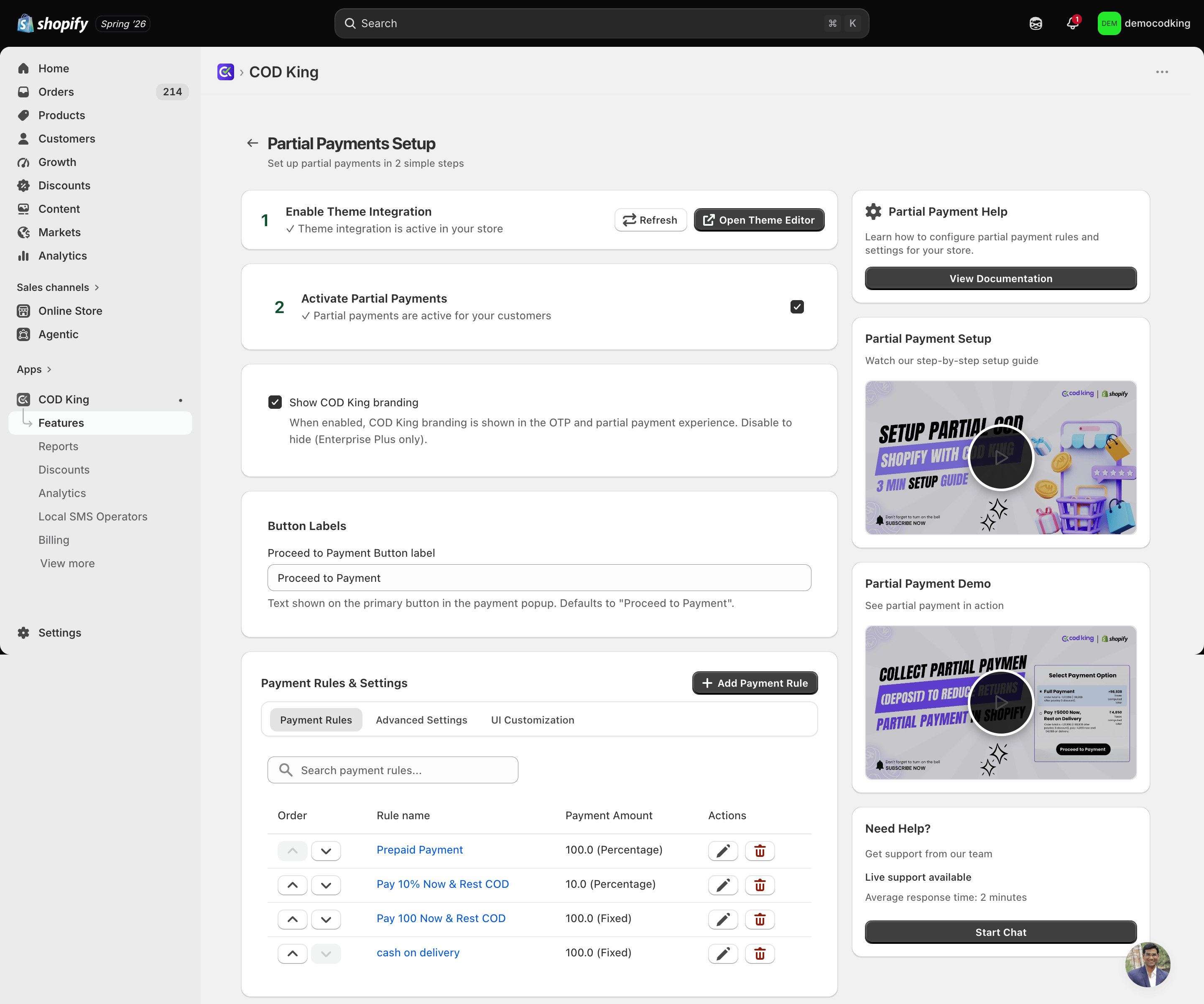
The Partial Payment dashboard allows you to configure exactly when advance payment should be collected.
You can configure:
* Collections
* Product Rules
* Customer Rules
* Pincode Rules
* Minimum & Maximum Cart Value
* Fixed Advance Amount
* Percentage Advance Amount
* Remaining COD Amount
* Rule Priority
* Enable / Disable Rules
***
## Features
### Collection Based Rules
Enable Partial Payment only for selected collections.
Example:
* Electronics
* Luxury Products
* Furniture
* High RTO Products
***
### Product Based Rules
Apply Partial Payment only for selected products.
Perfect for:
* Expensive items
* Customized products
* Limited edition products
* High-risk SKUs
***
### Pincode Based Rules
Control Partial Payment using delivery pin codes.
Examples:
* High RTO locations
* Remote areas
* Blacklisted locations
* State-wise configuration
***
### Customer Based Rules
Create rules based on customer information.
Examples:
* New Customers
* Returning Customers
* VIP Customers
* Tagged Customers
***
### Cart Value Rules
Configure Partial Payment based on order value.
Examples
| Cart Value | Advance |
| ------------- | ------------------ |
| ₹0 - ₹999 | No Partial Payment |
| ₹1000 - ₹4999 | ₹200 |
| ₹5000+ | 20% Advance |
***
### Fixed Amount
Collect a fixed advance amount.
Example:
Order Value
₹4,500
Advance
₹500
Remaining COD
₹4,000
***
### Percentage Based Payment
Collect a percentage of the order value.
Example
Order Value
₹5,000
Advance
20%
Customer Pays
₹1,000
Remaining COD
₹4,000
***
### Multiple Rules
Create multiple Partial Payment rules for different scenarios.
Example
* Rule 1 → Luxury Products → 20%
* Rule 2 → Electronics → ₹500
* Rule 3 → Delhi → 10%
* Rule 4 → New Customers → ₹300
RabbitPay automatically applies the matching rule.
***
### Enable / Disable Rules
Each rule can be enabled or disabled instantly without deleting it.
This makes testing and seasonal campaigns easier.
***
### Rule Priority
If multiple rules match the same order, RabbitPay evaluates them according to their configured priority.
This ensures predictable behavior for every checkout.
***
## Example Use Cases
### High Value Orders
Order above ₹10,000
Advance
20%
***
### Electronics Collection
Advance
₹500
***
### Luxury Collection
Advance
30%
***
### High Risk Pin Codes
Advance
₹300
***
### New Customers
Advance
₹200
***
### Festival Season
Collect
10%
Advance
for every COD order.
***
## Best Practices
* Use percentage-based payment for expensive products.
* Use fixed amounts for low-value orders.
* Configure pincode rules for high-RTO regions.
* Test every rule before making it live.
* Avoid collecting unnecessarily high advance payments.
* Review analytics regularly and optimize your rules.
* Keep your rules simple and easy to manage.
***
## Frequently Asked Questions
### Can I collect a fixed amount?
Yes.
You can collect any fixed amount before allowing Cash on Delivery.
***
### Can I collect a percentage instead?
Yes.
You can collect any percentage of the order value.
***
### Can I create multiple rules?
Yes.
There is no restriction on creating multiple Partial Payment rules.
***
### What happens if multiple rules match?
RabbitPay applies the rule according to the configured priority.
***
### Can I disable a rule without deleting it?
Yes.
Every rule can be enabled or disabled instantly.
***
### Does Partial Payment work with COD?
Yes.
Customers pay only the advance amount online, while the remaining balance is collected by the courier during delivery.
***
### Can I use Partial Payment with COD Rules?
Absolutely.
Partial Payment works seamlessly with COD Rules, COD Fees, OTP Verification, and other RabbitPay checkout features.
***
## Tips
Start with a small advance payment (10–20%) and gradually optimize your rules based on RTO performance and customer behavior.
Always test your Partial Payment configuration before enabling it for all customers to ensure the checkout behaves as expected.
***
## Related Guides
Learn how to control Cash on Delivery availability.
Charge additional fees for Cash on Delivery orders.
Encourage prepaid orders using automatic discounts.
Secure checkout using OTP verification.
***
# Need Help?
If you need help configuring Partial Payment, our support team is ready to assist.
Get help from our support team.
Browse all RabbitPay guides and tutorials.
💡 **Pro Tip:** Merchants using Partial Payment together with COD Rules and OTP Verification typically see a significant reduction in fake COD orders and Return to Origin (RTO).
 # Partial Payment
Partial Payment allows you to collect a fixed amount or percentage from customers before confirming a Cash on Delivery (COD) order. The remaining amount is collected by your courier partner at the time of delivery.
This helps merchants reduce Return to Origin (RTO), eliminate fake COD orders, improve cash flow, and increase order commitment without completely removing the COD payment option.
***
## How It Works
1. Customer adds products to the cart.
2. Customer proceeds to checkout.
3. RabbitPay evaluates all configured Partial Payment rules.
4. If the order matches a rule, the customer is asked to pay the configured advance amount.
5. The advance payment is collected securely.
6. The remaining amount is automatically marked as Cash on Delivery.
7. The order is placed successfully.
***
## Why Use Partial Payment?
Partial Payment is designed to improve order quality while maintaining the convenience of Cash on Delivery.
### Benefits
* ✅ Reduce fake COD orders
* ✅ Lower Return to Origin (RTO)
* ✅ Improve customer commitment
* ✅ Increase prepaid revenue
* ✅ Improve cash flow
* ✅ Reduce logistics losses
* ✅ Continue offering COD to genuine customers
* ✅ Build customer trust with secure advance payments
***
## Dashboard Overview
The Partial Payment dashboard allows you to configure exactly when advance payment should be collected.
You can configure:
* Collections
* Product Rules
* Customer Rules
* Pincode Rules
* Minimum & Maximum Cart Value
* Fixed Advance Amount
* Percentage Advance Amount
* Remaining COD Amount
* Rule Priority
* Enable / Disable Rules
***
## Features
### Collection Based Rules
Enable Partial Payment only for selected collections.
Example:
* Electronics
* Luxury Products
* Furniture
* High RTO Products
***
### Product Based Rules
Apply Partial Payment only for selected products.
Perfect for:
* Expensive items
* Customized products
* Limited edition products
* High-risk SKUs
***
### Pincode Based Rules
Control Partial Payment using delivery pin codes.
Examples:
* High RTO locations
* Remote areas
* Blacklisted locations
* State-wise configuration
***
### Customer Based Rules
Create rules based on customer information.
Examples:
* New Customers
* Returning Customers
* VIP Customers
* Tagged Customers
***
### Cart Value Rules
Configure Partial Payment based on order value.
Examples
| Cart Value | Advance |
| ------------- | ------------------ |
| ₹0 - ₹999 | No Partial Payment |
| ₹1000 - ₹4999 | ₹200 |
| ₹5000+ | 20% Advance |
***
### Fixed Amount
Collect a fixed advance amount.
Example:
Order Value
₹4,500
Advance
₹500
Remaining COD
₹4,000
***
### Percentage Based Payment
Collect a percentage of the order value.
Example
Order Value
₹5,000
Advance
20%
Customer Pays
₹1,000
Remaining COD
₹4,000
***
### Multiple Rules
Create multiple Partial Payment rules for different scenarios.
Example
* Rule 1 → Luxury Products → 20%
* Rule 2 → Electronics → ₹500
* Rule 3 → Delhi → 10%
* Rule 4 → New Customers → ₹300
RabbitPay automatically applies the matching rule.
***
### Enable / Disable Rules
Each rule can be enabled or disabled instantly without deleting it.
This makes testing and seasonal campaigns easier.
***
### Rule Priority
If multiple rules match the same order, RabbitPay evaluates them according to their configured priority.
This ensures predictable behavior for every checkout.
***
## Example Use Cases
### High Value Orders
Order above ₹10,000
Advance
20%
***
### Electronics Collection
Advance
₹500
***
### Luxury Collection
Advance
30%
***
### High Risk Pin Codes
Advance
₹300
***
### New Customers
Advance
₹200
***
### Festival Season
Collect
10%
Advance
for every COD order.
***
## Best Practices
* Use percentage-based payment for expensive products.
* Use fixed amounts for low-value orders.
* Configure pincode rules for high-RTO regions.
* Test every rule before making it live.
* Avoid collecting unnecessarily high advance payments.
* Review analytics regularly and optimize your rules.
* Keep your rules simple and easy to manage.
***
## Frequently Asked Questions
### Can I collect a fixed amount?
Yes.
You can collect any fixed amount before allowing Cash on Delivery.
***
### Can I collect a percentage instead?
Yes.
You can collect any percentage of the order value.
***
### Can I create multiple rules?
Yes.
There is no restriction on creating multiple Partial Payment rules.
***
### What happens if multiple rules match?
RabbitPay applies the rule according to the configured priority.
***
### Can I disable a rule without deleting it?
Yes.
Every rule can be enabled or disabled instantly.
***
### Does Partial Payment work with COD?
Yes.
Customers pay only the advance amount online, while the remaining balance is collected by the courier during delivery.
***
### Can I use Partial Payment with COD Rules?
Absolutely.
Partial Payment works seamlessly with COD Rules, COD Fees, OTP Verification, and other RabbitPay checkout features.
***
## Tips
# Partial Payment
Partial Payment allows you to collect a fixed amount or percentage from customers before confirming a Cash on Delivery (COD) order. The remaining amount is collected by your courier partner at the time of delivery.
This helps merchants reduce Return to Origin (RTO), eliminate fake COD orders, improve cash flow, and increase order commitment without completely removing the COD payment option.
***
## How It Works
1. Customer adds products to the cart.
2. Customer proceeds to checkout.
3. RabbitPay evaluates all configured Partial Payment rules.
4. If the order matches a rule, the customer is asked to pay the configured advance amount.
5. The advance payment is collected securely.
6. The remaining amount is automatically marked as Cash on Delivery.
7. The order is placed successfully.
***
## Why Use Partial Payment?
Partial Payment is designed to improve order quality while maintaining the convenience of Cash on Delivery.
### Benefits
* ✅ Reduce fake COD orders
* ✅ Lower Return to Origin (RTO)
* ✅ Improve customer commitment
* ✅ Increase prepaid revenue
* ✅ Improve cash flow
* ✅ Reduce logistics losses
* ✅ Continue offering COD to genuine customers
* ✅ Build customer trust with secure advance payments
***
## Dashboard Overview
The Partial Payment dashboard allows you to configure exactly when advance payment should be collected.
You can configure:
* Collections
* Product Rules
* Customer Rules
* Pincode Rules
* Minimum & Maximum Cart Value
* Fixed Advance Amount
* Percentage Advance Amount
* Remaining COD Amount
* Rule Priority
* Enable / Disable Rules
***
## Features
### Collection Based Rules
Enable Partial Payment only for selected collections.
Example:
* Electronics
* Luxury Products
* Furniture
* High RTO Products
***
### Product Based Rules
Apply Partial Payment only for selected products.
Perfect for:
* Expensive items
* Customized products
* Limited edition products
* High-risk SKUs
***
### Pincode Based Rules
Control Partial Payment using delivery pin codes.
Examples:
* High RTO locations
* Remote areas
* Blacklisted locations
* State-wise configuration
***
### Customer Based Rules
Create rules based on customer information.
Examples:
* New Customers
* Returning Customers
* VIP Customers
* Tagged Customers
***
### Cart Value Rules
Configure Partial Payment based on order value.
Examples
| Cart Value | Advance |
| ------------- | ------------------ |
| ₹0 - ₹999 | No Partial Payment |
| ₹1000 - ₹4999 | ₹200 |
| ₹5000+ | 20% Advance |
***
### Fixed Amount
Collect a fixed advance amount.
Example:
Order Value
₹4,500
Advance
₹500
Remaining COD
₹4,000
***
### Percentage Based Payment
Collect a percentage of the order value.
Example
Order Value
₹5,000
Advance
20%
Customer Pays
₹1,000
Remaining COD
₹4,000
***
### Multiple Rules
Create multiple Partial Payment rules for different scenarios.
Example
* Rule 1 → Luxury Products → 20%
* Rule 2 → Electronics → ₹500
* Rule 3 → Delhi → 10%
* Rule 4 → New Customers → ₹300
RabbitPay automatically applies the matching rule.
***
### Enable / Disable Rules
Each rule can be enabled or disabled instantly without deleting it.
This makes testing and seasonal campaigns easier.
***
### Rule Priority
If multiple rules match the same order, RabbitPay evaluates them according to their configured priority.
This ensures predictable behavior for every checkout.
***
## Example Use Cases
### High Value Orders
Order above ₹10,000
Advance
20%
***
### Electronics Collection
Advance
₹500
***
### Luxury Collection
Advance
30%
***
### High Risk Pin Codes
Advance
₹300
***
### New Customers
Advance
₹200
***
### Festival Season
Collect
10%
Advance
for every COD order.
***
## Best Practices
* Use percentage-based payment for expensive products.
* Use fixed amounts for low-value orders.
* Configure pincode rules for high-RTO regions.
* Test every rule before making it live.
* Avoid collecting unnecessarily high advance payments.
* Review analytics regularly and optimize your rules.
* Keep your rules simple and easy to manage.
***
## Frequently Asked Questions
### Can I collect a fixed amount?
Yes.
You can collect any fixed amount before allowing Cash on Delivery.
***
### Can I collect a percentage instead?
Yes.
You can collect any percentage of the order value.
***
### Can I create multiple rules?
Yes.
There is no restriction on creating multiple Partial Payment rules.
***
### What happens if multiple rules match?
RabbitPay applies the rule according to the configured priority.
***
### Can I disable a rule without deleting it?
Yes.
Every rule can be enabled or disabled instantly.
***
### Does Partial Payment work with COD?
Yes.
Customers pay only the advance amount online, while the remaining balance is collected by the courier during delivery.
***
### Can I use Partial Payment with COD Rules?
Absolutely.
Partial Payment works seamlessly with COD Rules, COD Fees, OTP Verification, and other RabbitPay checkout features.
***
## Tips